Go Back




Meeting Scheduling Retry System
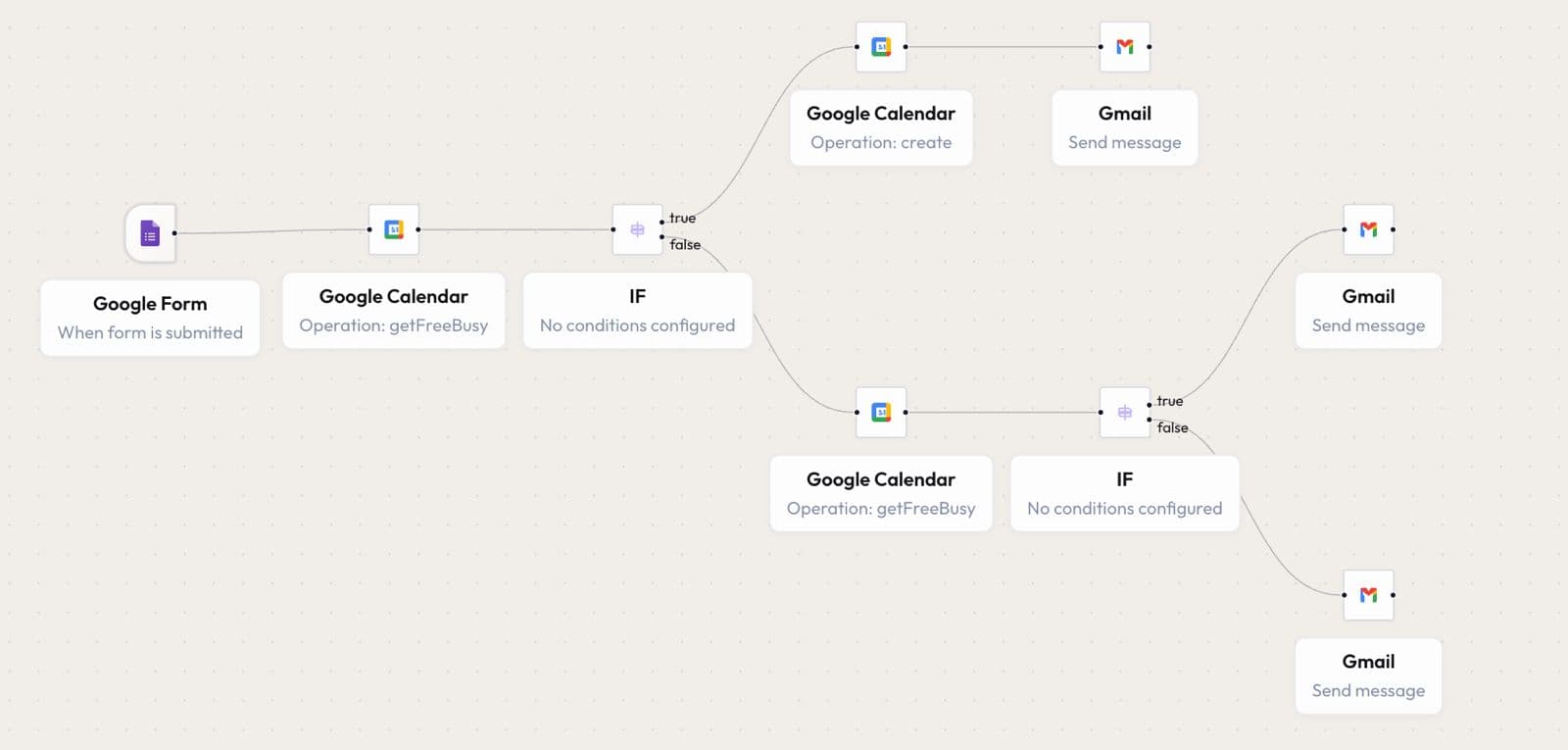
This workflow automatically schedules meetings with clients based on availability. If a time slot is unavailable, it checks for other available options. If no slots are found, the client is asked to choose another time. The workflow continues until a meeting is successfully scheduled or cancelled.
Use Cases
Meeting SchedulingCalendar AutomationClient BookingAvailability Checking
Created By
Autom8AI Admin
Last Update
1 Week Ago
Click to expand
Workflow Diagram
How it Works
Google Form Trigger: The workflow begins when a client submits a meeting request. The submitted details such as preferred date and time are captured automatically.
Availability Check: Google Calendar is queried to check if the requested time slot is available. An IF condition evaluates whether the slot is free or already booked.
- Slot Available: A new meeting is automatically created in Google Calendar.
- Confirmation Email: Once scheduled, a confirmation email is sent to the client.
- Slot Unavailable: The workflow checks another available time slot.
- Retry Scheduling: The system continues checking alternative slots until one is found.
- Fallback Email: If no suitable slot is available, an email is sent requesting the client to choose another time.