Go Back




Payment Follow-up System
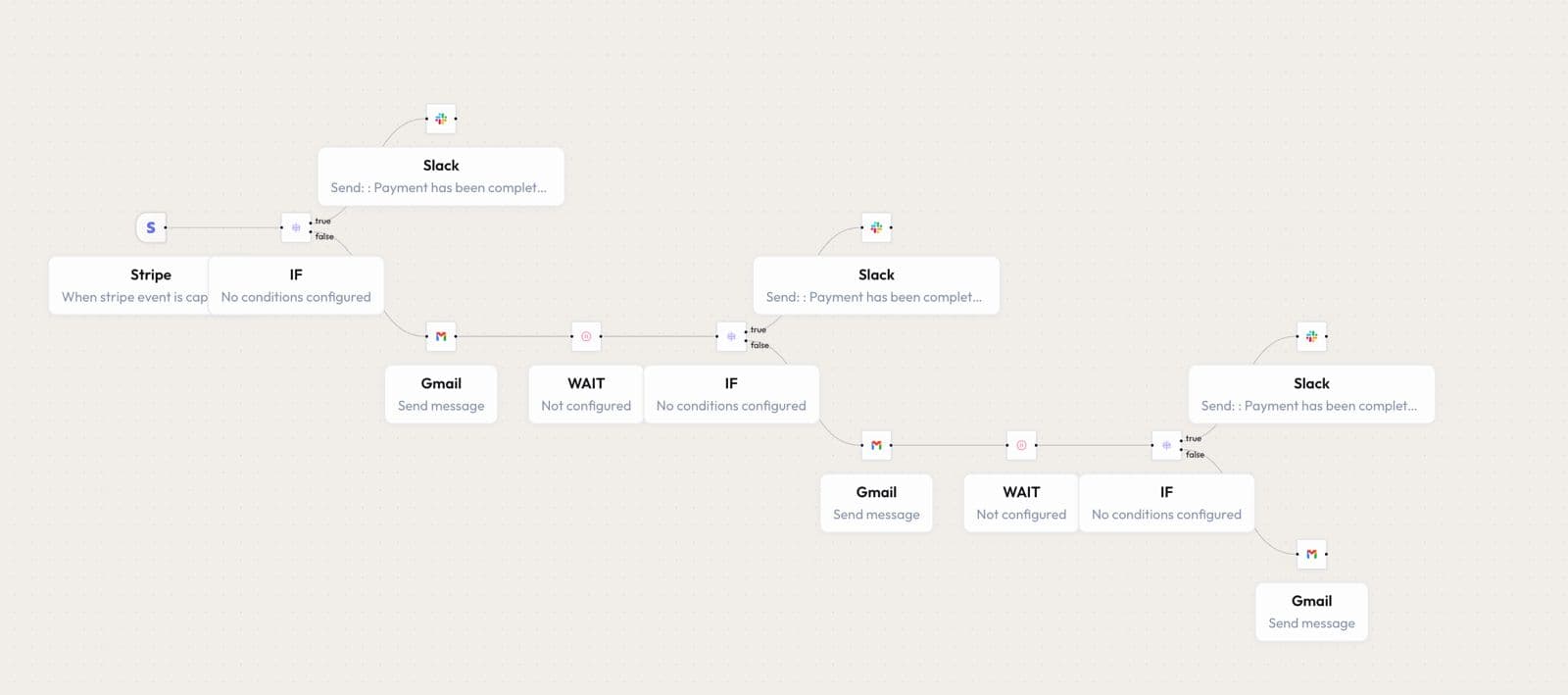
This workflow tracks pending payments and automatically sends reminder messages. If payment is not completed, it sends additional reminders after set intervals. The workflow continues follow-ups until the payment is received. Once payment is completed, reminders stop and the team is notified.
Use Cases
Payment RemindersInvoice Follow-upsAccounts ReceivablePayment Tracking
Created By
Autom8AI Admin
Last Update
1 Week Ago
Click to expand
Workflow Diagram
How it Works
Stripe Trigger: The workflow begins when a Stripe payment event is captured. The system checks whether the payment has been completed or is still pending.
Payment Check: An IF condition evaluates the payment status. If successful, the workflow notifies the team and stops further reminders.
- Payment Completed: Sends an instant Slack notification to inform the team.
- Payment Pending: Sends a reminder email to the customer requesting payment.
- Wait & Retry: The workflow waits for a defined period and checks again.
- Repeated Follow-ups: Additional reminder emails are sent automatically at scheduled intervals.
- Final Completion: Once payment is received at any stage, reminders stop and the team is notified via Slack.