



Sales Reply Manager
This workflow automatically analyzes incoming sales replies and understands customer intent. It notifies the sales team when a lead is interested, marks uninterested responses, and sends helpful replies when more information is requested. If there is no response, the workflow automatically sends follow-up reminders.
Use Cases
Created By

Autom8AI Admin
Last Update
1 Week Ago
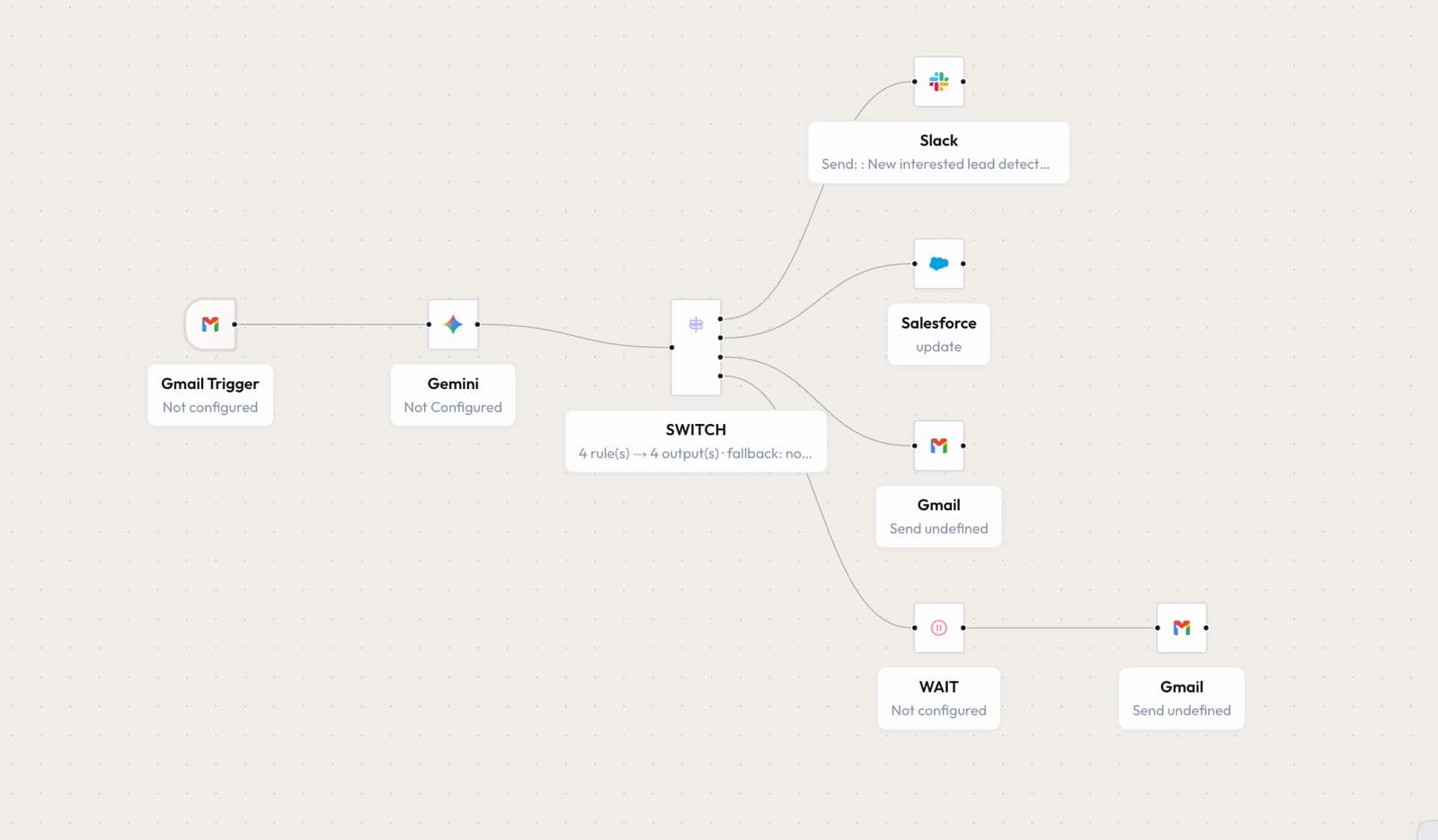
Workflow Diagram
How it Works
Gmail Trigger: The workflow starts when a new reply is received to a sales email. The incoming email content is captured and passed to the AI model for understanding.
AI Analysis: The email reply is processed using Gemini AI to understand the customer's intent — interested, not interested, requesting more information, or no clear response.
Based on the AI classification, the workflow takes the following actions:
- Interested Lead: Sends an instant notification to Slack so the sales team can quickly follow up.
- Update CRM: Updates Salesforce with the latest lead status to keep customer records organized.
- More Information Requested: Automatically sends a helpful response email with additional details.
- No Response / Follow-up: Waits for a defined period and automatically sends a follow-up email reminder.